An AI assistant reads a bug report, opens the code, changes a function and runs the tests.
Which part of that was the LLM? Which part was the agent? Where do the harness, the loop and the graph come in?
People use these words as if they mean the same thing. They don't. They aren't five products, and they aren't five levels of sophistication. They're five different parts of one system, and each one answers a different question.
We'll follow one example the whole way through:
Bug report #142: Login fails after a password reset.
Prefer to watch first? The 100-second version is here, and you can try it yourself at the end.
1. LLM: the part that thinks up the next move
An LLM (large language model) takes input and generates output. In a coding assistant, that output might be an explanation, some suggested code, or a request to use a tool.
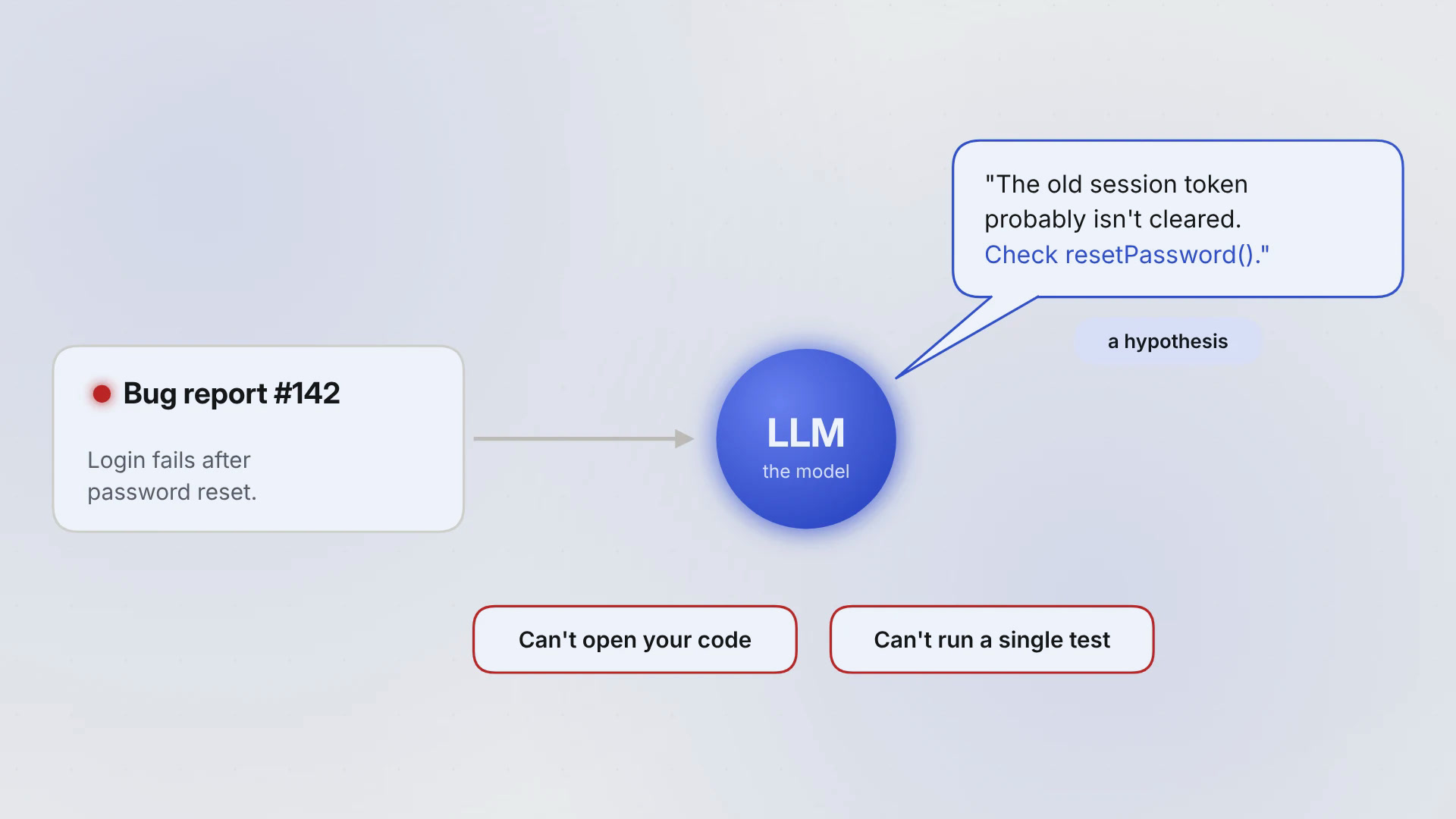
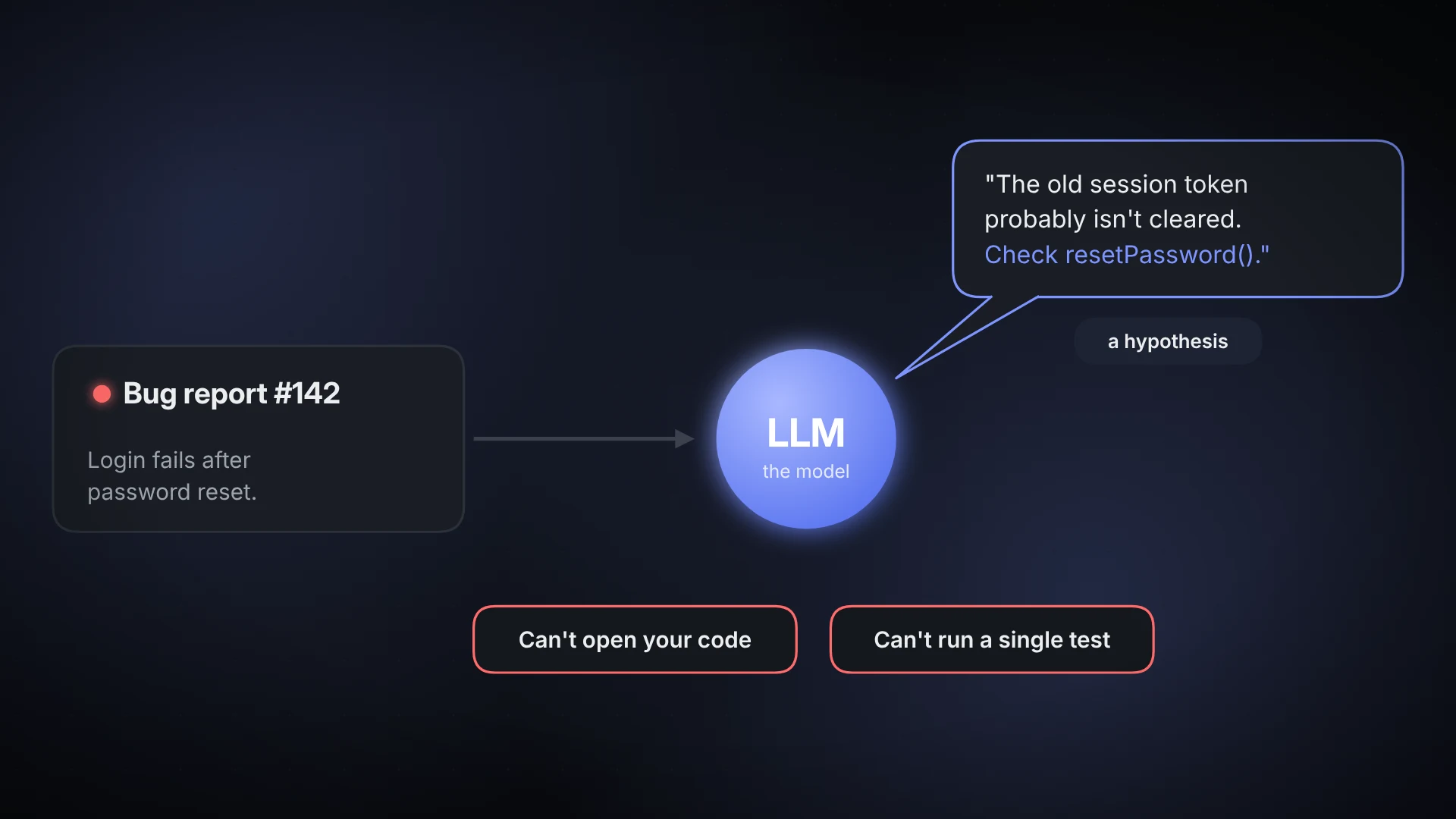
Give it the bug report and it might say:
"The old session token probably isn't cleared on reset. Check resetPassword()."
That's a good guess. It's still only a guess. The model hasn't opened the code, hasn't reproduced the bug and can't run a single test. On its own it can't do any of those things. It can only propose them.
The point: proposing an action and carrying it out are two separate jobs.
Use it on its own for: one-shot tasks. Drafting, summarising, classifying, answering one question.
In the wild: ask Claude, ChatGPT or Gemini a question in their apps and you're mostly talking to the model. The apps add a thin harness on top (web search, file uploads), but the core job is the same: input in, answer out.
2. Harness: the software that lets the model touch the real world
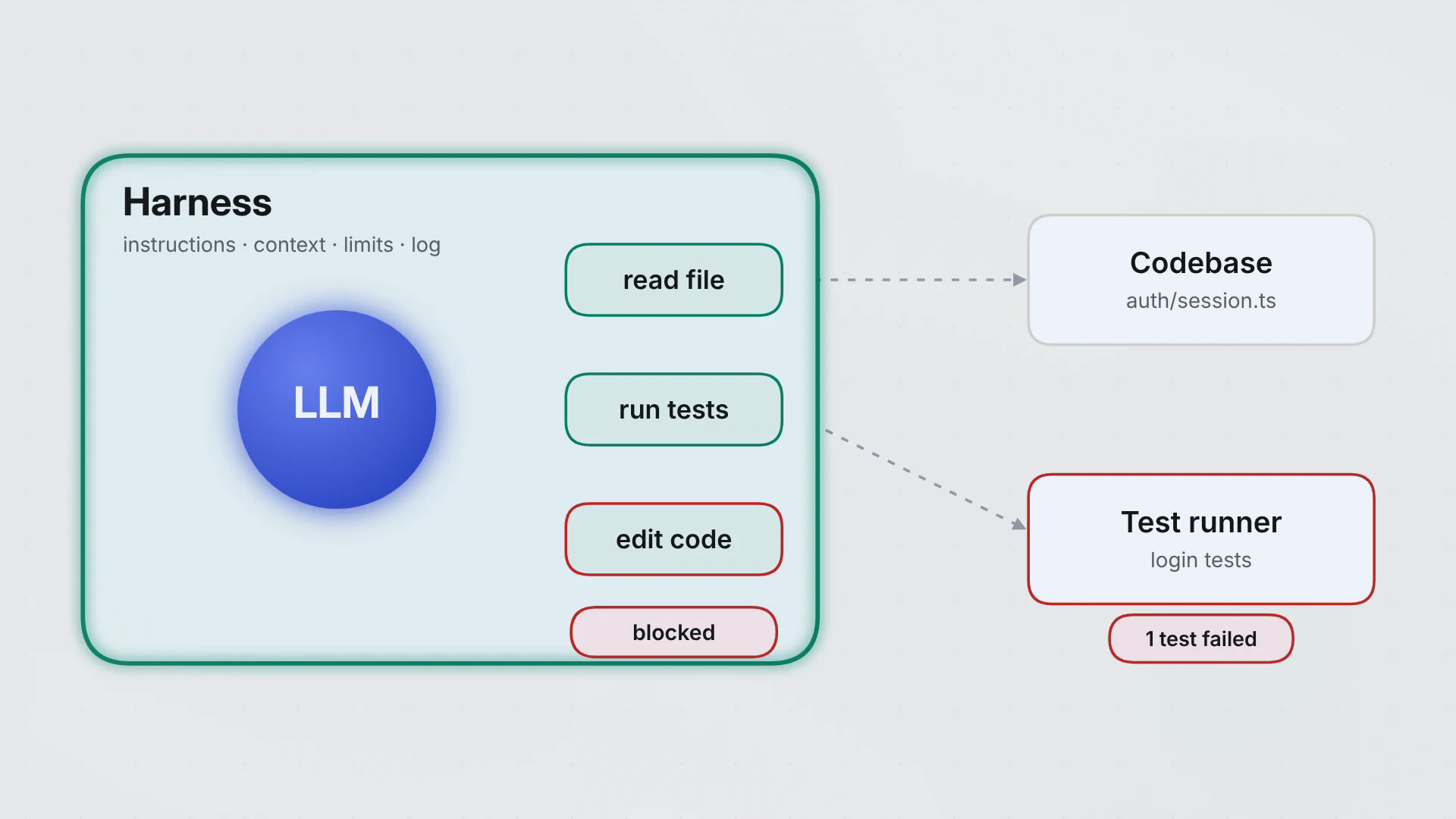
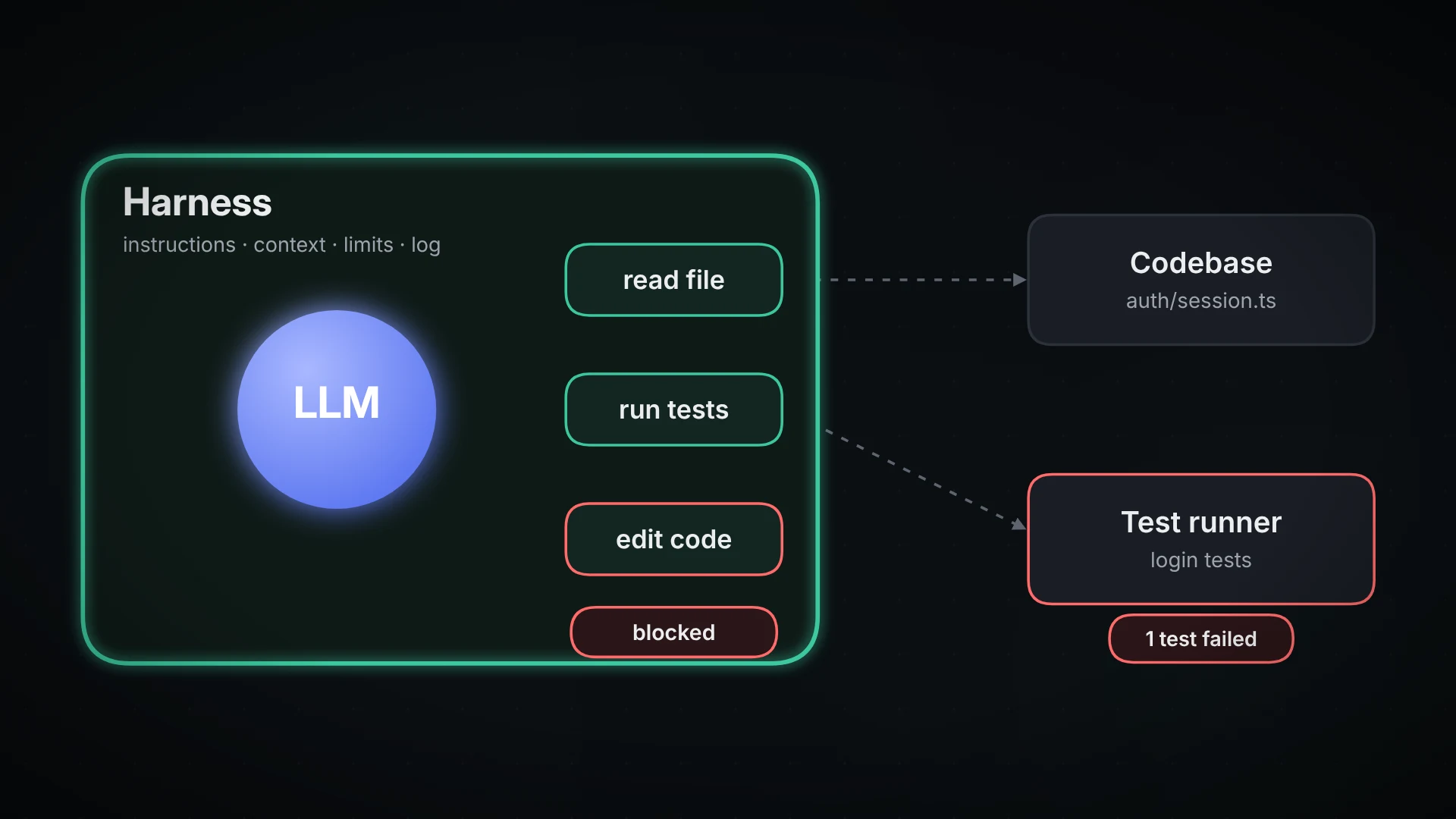
A harness is the code wrapped around the model. It gives the model instructions, context and tools. It carries out the tool requests the model is allowed to make, sends back the results, enforces limits and keeps a log.
For our bug, the exchange looks like this:
- The model asks to read
auth/session.ts. The harness reads it and returns the contents. - The model asks to run the login tests. The harness runs them and reports back:
test_login_after_resetfailed.
The model never touches the machine. The harness does, and the harness decides what the model is allowed to do.
A harness can power a single answer, a fixed workflow or an agent. Giving a model tools doesn't make it an agent.
The point: the model asks. The harness acts, within the rules.
Use it when: the model has to work with real files, systems or data.
In the wild: Claude Code, OpenAI's Codex and Google's Gemini CLI are harnesses at heart. They decide which tools the model gets, run them on your machine (or in the cloud), and can ask for your approval before anything risky. If you want to build your own, the Claude Agent SDK gives you the same harness Claude Code runs on.
3. Agent: a system where the model chooses its next step
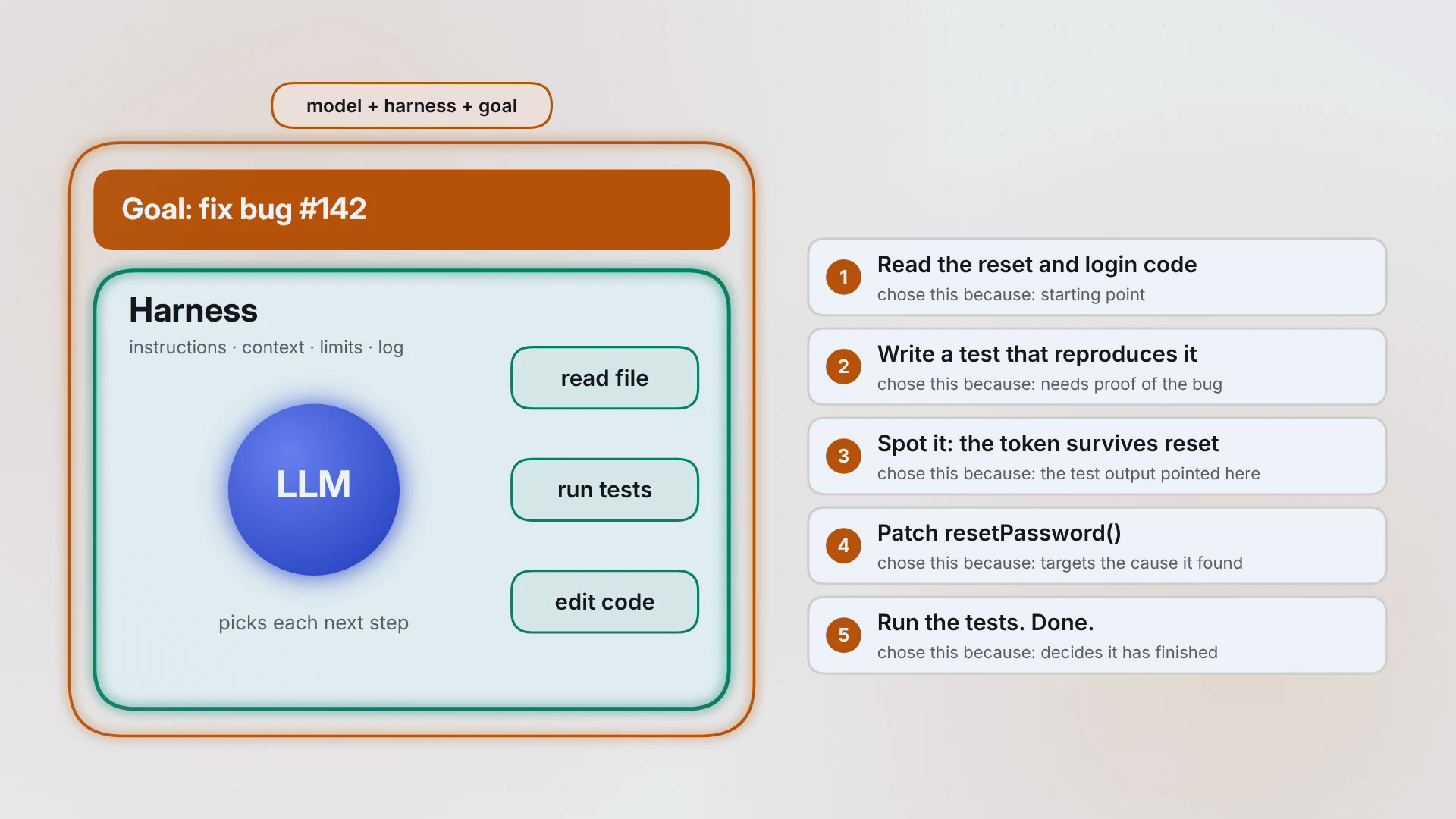
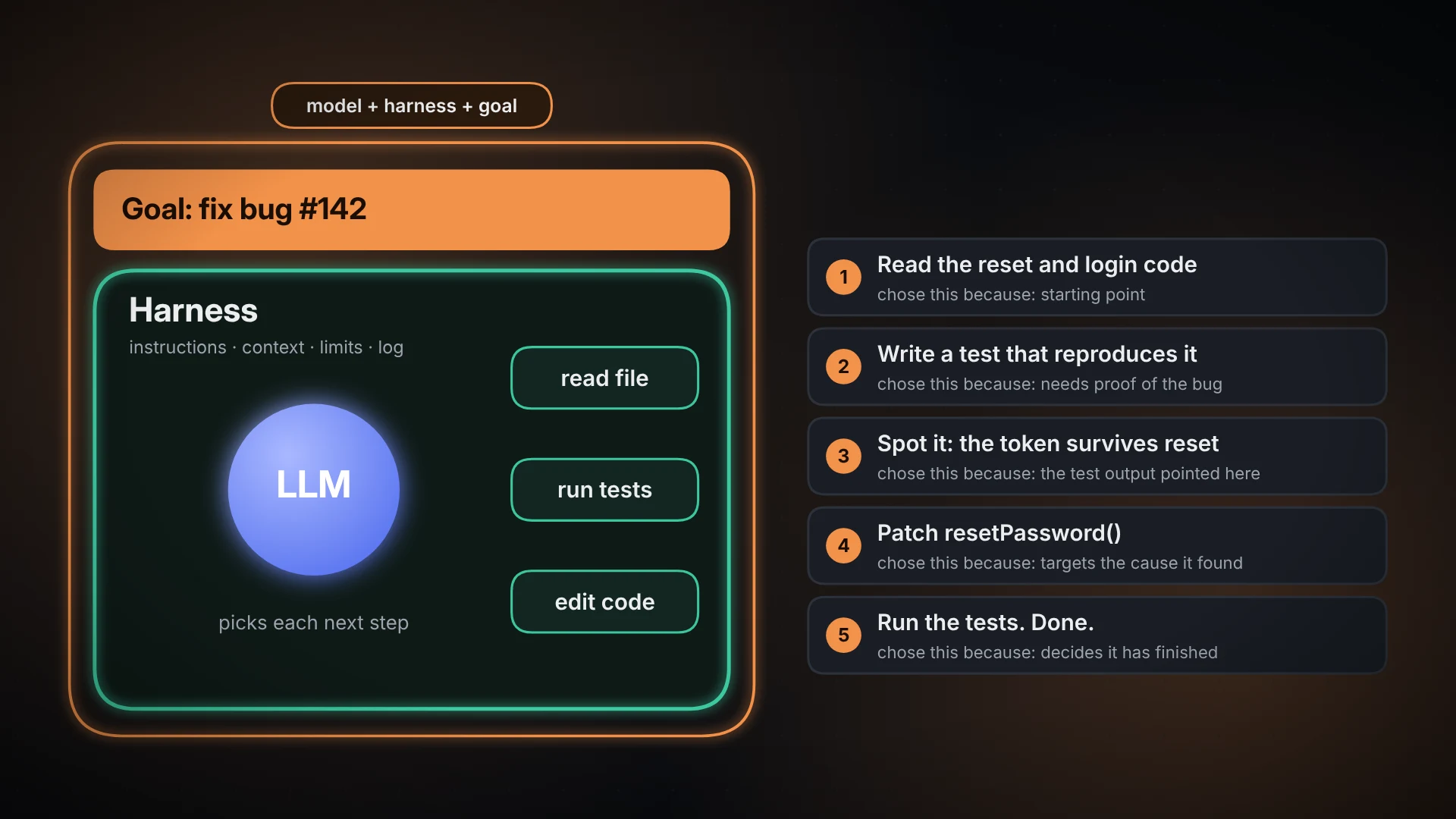
Put a model in a harness, give it a goal, and let the model decide what to do next. That's an agent.
Goal: fix the login bug. The agent might:
- Read the password reset and login code.
- Write a test that reproduces the failure.
- Notice the session token survives the reset.
- Edit
resetPassword()to clear it. - Run the tests and decide whether it's done.
Nobody scripted that order. Each step depended on what the last one turned up.
A fixed workflow could do the same actions in a set order. The difference is who controls the sequence: code that decided it in advance, or a model deciding as it goes. Plenty of real systems mix both.
The point: an agent has a say over its next action, inside the limits the harness sets.
Use it when: you can't know the steps up front, because they depend on what turns up.
In the wild: type "fix the failing login test" into Claude Code or Codex and watch. It chooses which files to read, what to run and when it's finished. That's the agent part. Codex and Claude Code can also run that work in the cloud, so it keeps going after you close your laptop.
4. Loop engineering: deciding how the work repeats and when it stops
(A working label, not an industry standard term.)
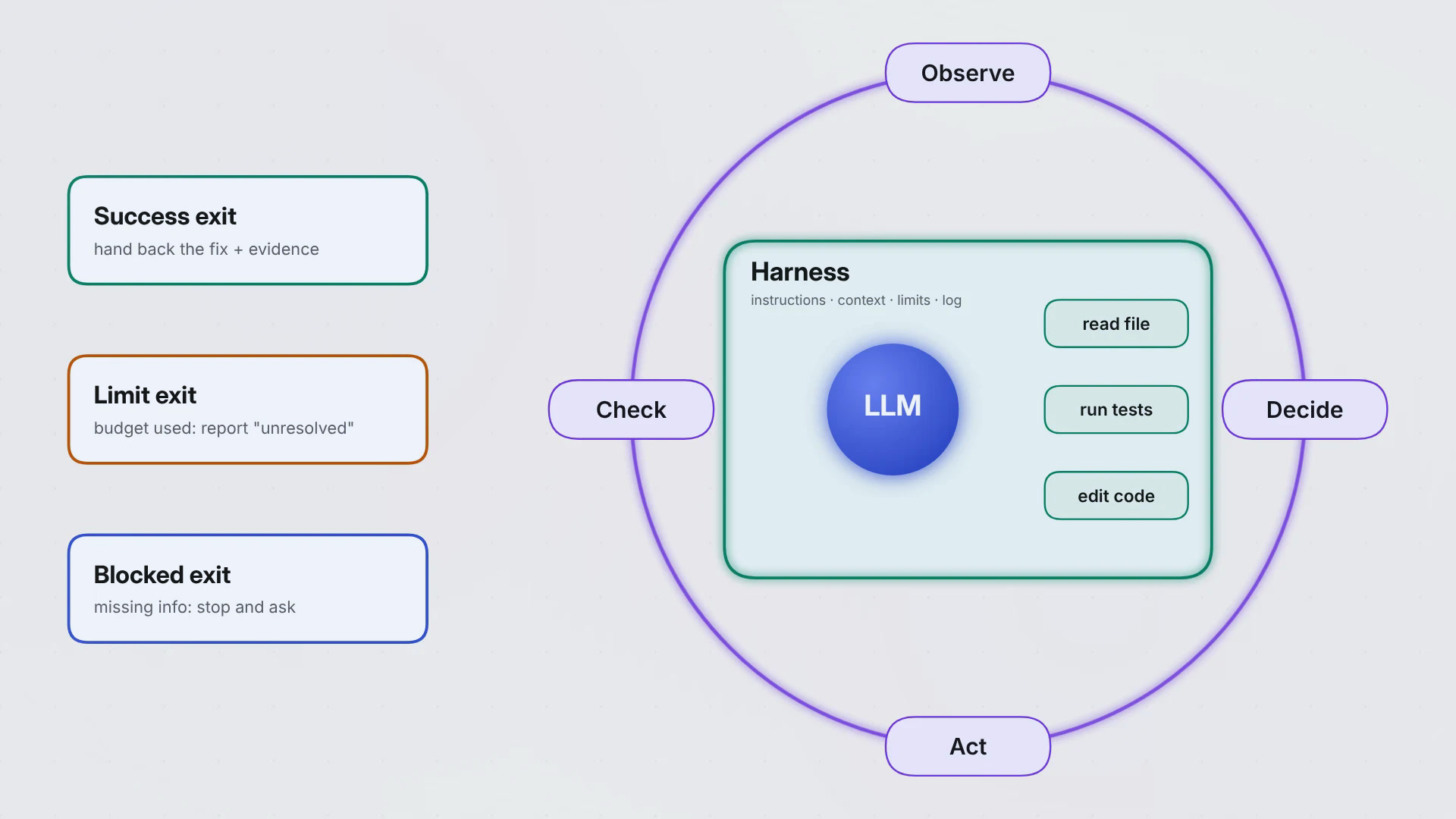
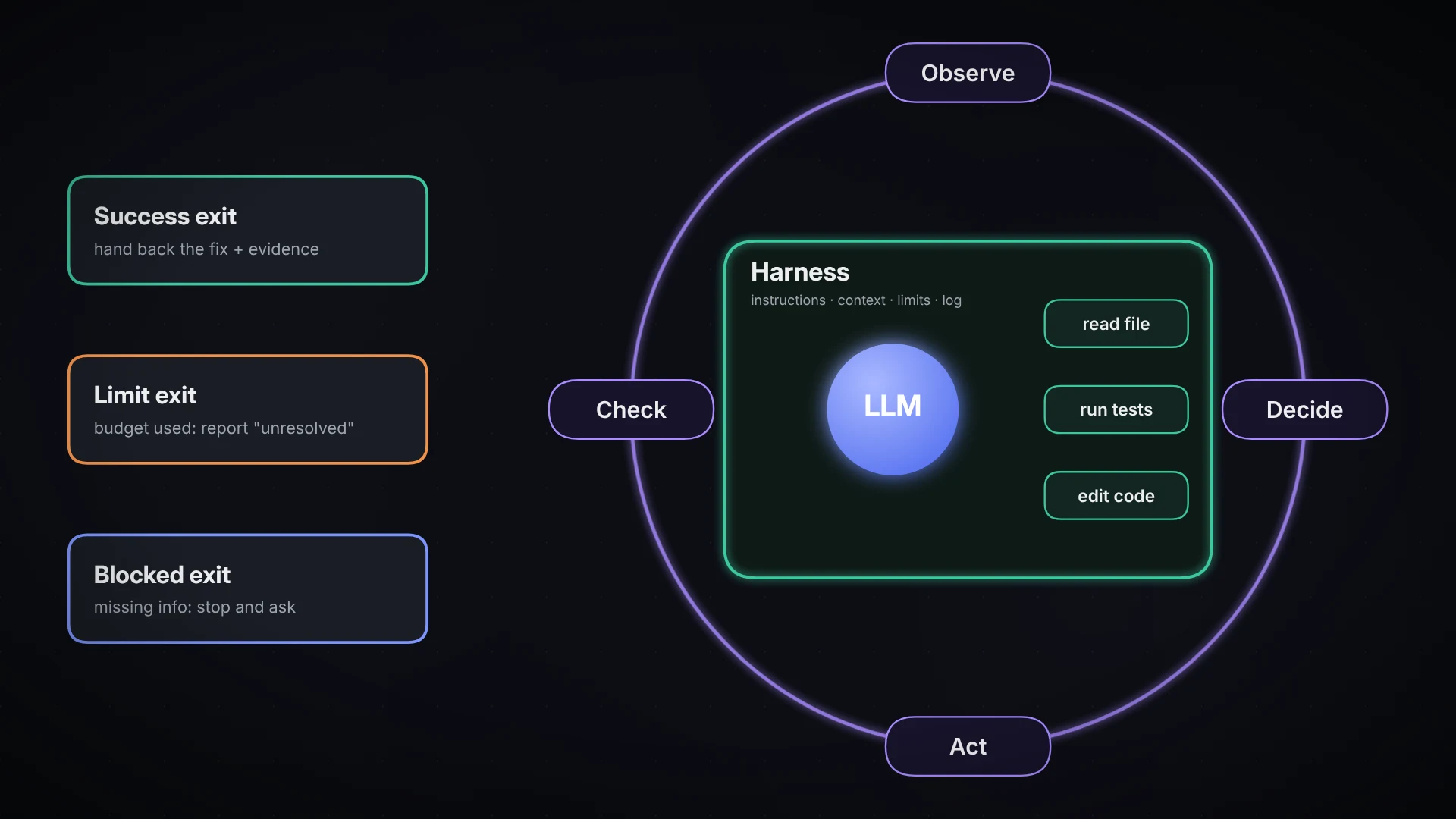
Agents tend to run in a cycle: observe, decide, act, check, then go again or stop. Loop engineering means designing that cycle on purpose, especially the checks and the exits.
For the login bug, "keep trying until the tests pass" isn't enough. A good loop has:
- Proof of the bug: a test that fails for the reported reason before the fix.
- Proof of progress: that test passes after the change, and the existing tests still pass.
- A success exit: stop and hand back the fix with the evidence.
- A limit exit: after, say, three attempts (or a time or cost budget), stop and report it as unresolved. Don't fail quietly and don't loop forever.
- A blocked exit: if it needs information or access it doesn't have, stop and ask.
One warning. Passing checks don't prove the fix is right. They prove it passed the checks you wrote. A loop is only as good as its checks.
Loops aren't unique to agents, either. Ordinary software retries things all the time. Repeating doesn't make something an agent.
The point: the loop decides how feedback leads to another attempt or an exit.
Use it when: one attempt isn't reliable enough and you need to verify and retry.
In the wild: the bluntest version is to run the same prompt again and again, each time with a fresh start, until the work matches the spec. It can work, but it burns tokens, and it only stops well if the checks are good. Most tools build in quieter loops: coding agents can run your tests after every edit, and workflow tools cap how many times an agent step can repeat. That cap is a limit exit.
5. Graph engineering: making the routes explicit
(Also a working label.)
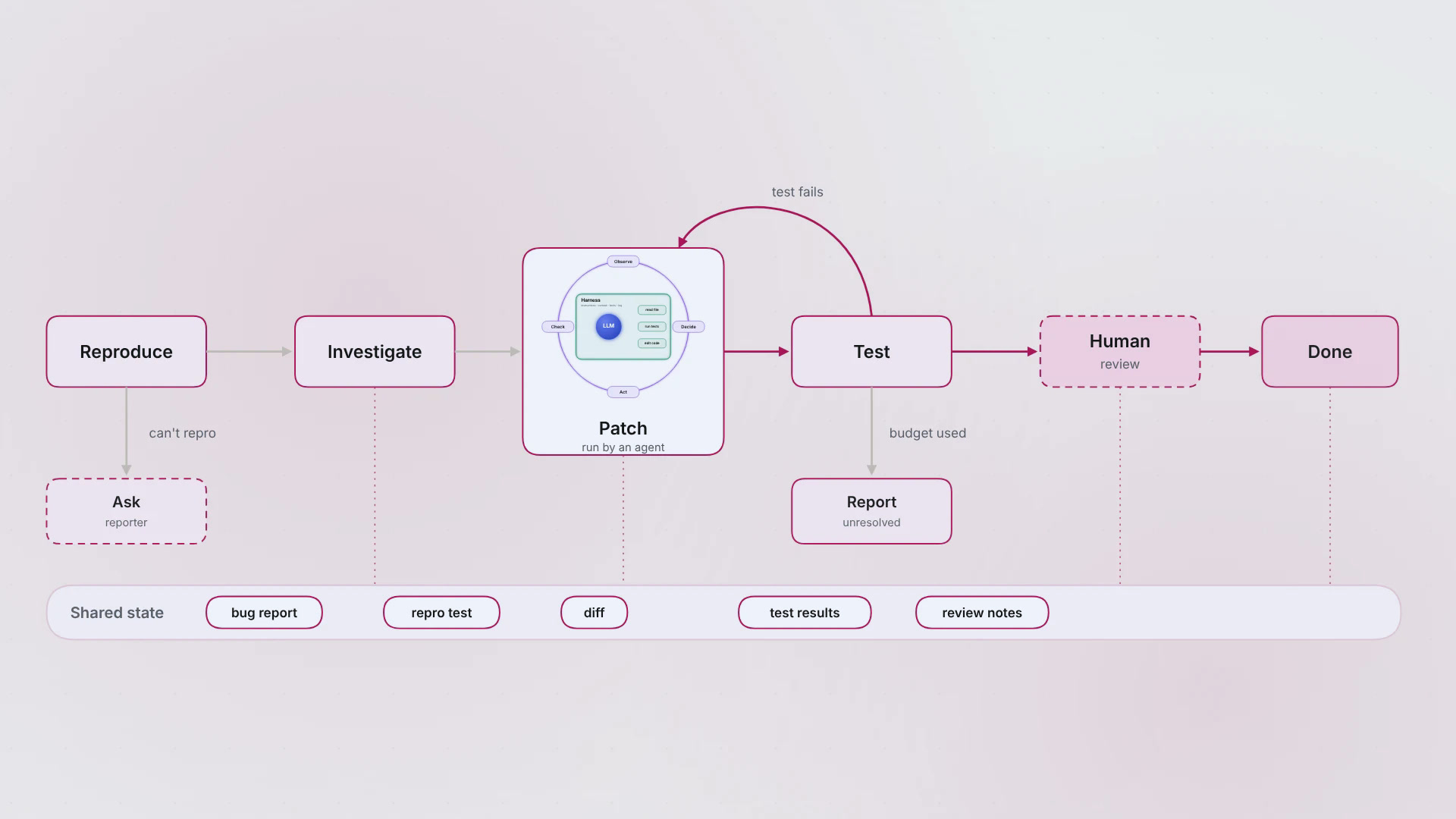
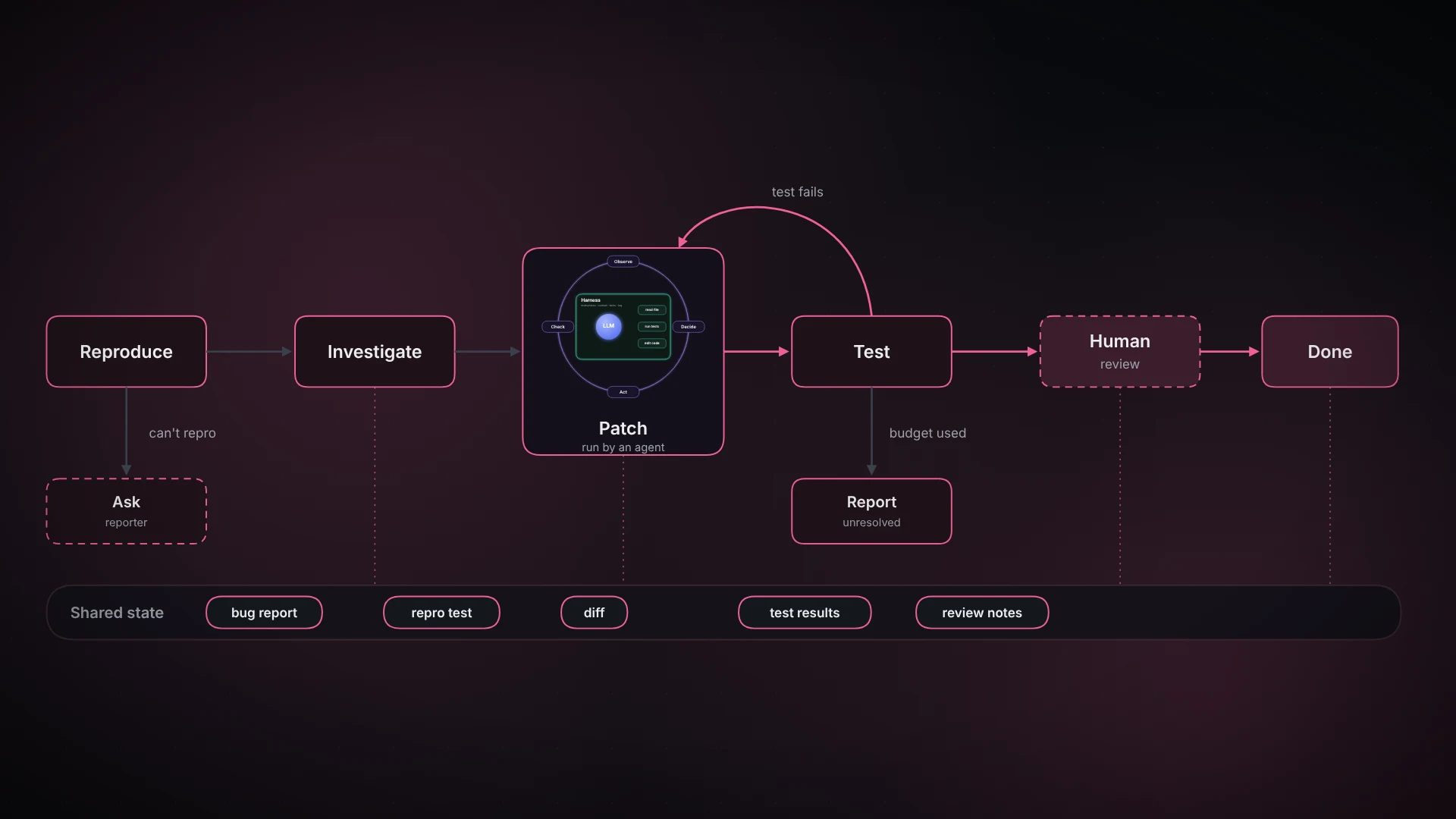
A graph breaks the work into named steps (nodes) with routes between them (edges), plus shared information that every step can read.
For our bug:
Reproduce → Investigate → Patch → Test → Review → Done
The interesting part is the branches:
- Can't reproduce the bug? Ask the reporter for more detail.
- Test fails? Go back to Patch (or Investigate, if the failure says the diagnosis was wrong).
- Change looks risky? Send it to a human for review before it ships.
- Review finds a problem? Route it back for another patch.
- Budget used up? Stop and report what's unresolved.
Every step reads the same shared state: the bug report, the test that reproduces it, the diff and the test results.
Two common misreadings:
- A graph can contain loops. "Test fails, back to Patch" is a loop inside the graph.
- A graph doesn't need multiple agents, or any agent at all. Nodes can be plain code, single model calls, an agent step or a human decision.
The point: the graph shows every path the work can take, so it can be followed and audited.
Use it when: stages, approvals or handoffs have to be explicit.
In the wild: LangGraph builds agents as graphs in code, with nodes, edges, shared state, saved checkpoints, and a pause point for human approval. n8n does the same visually, so a support team can see "reply, escalate or raise a ticket" as actual boxes and arrows.
How they fit together
| Term | The question it answers |
|---|---|
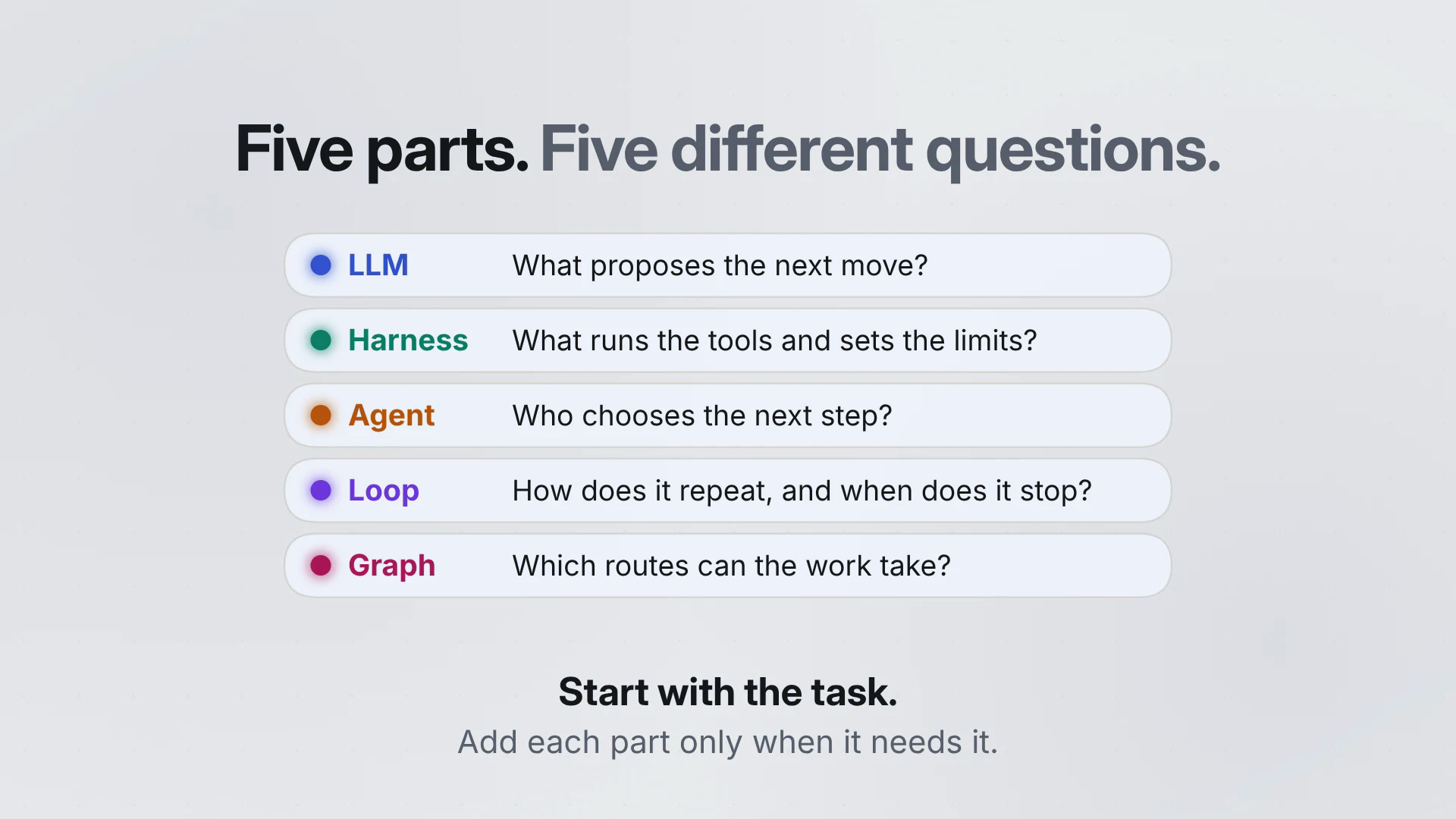
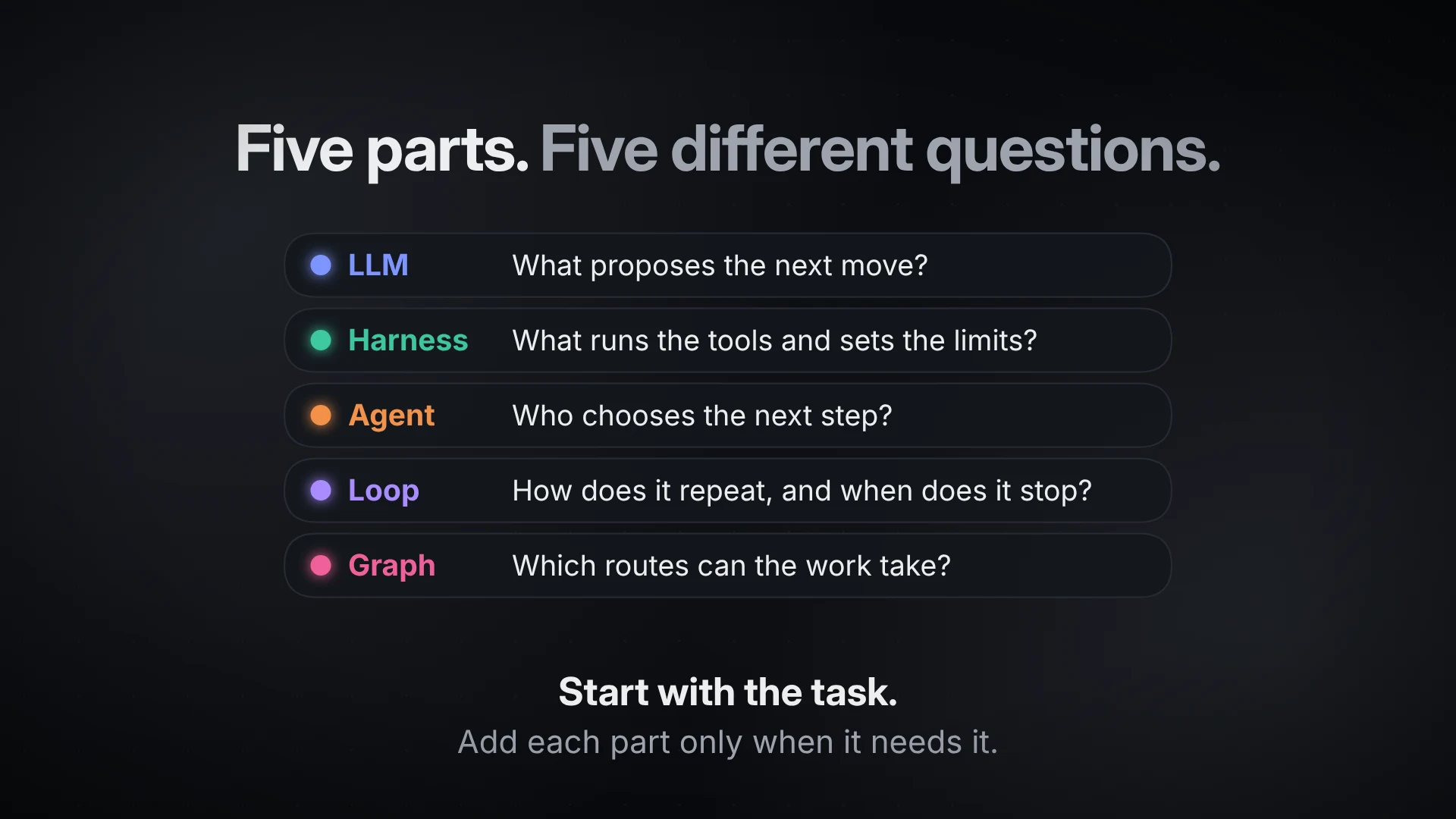
| LLM | What proposes the next response or action? |
| Harness | What supplies context, runs the tools and enforces limits? |
| Agent | Who chooses the next step as new information arrives? |
| Loop | How does the work repeat, and when does it stop? |
| Graph | Which steps and routes can the work follow? |
For the login bug: the model suggests the fix, the harness reads files and runs tests, the agent chooses what to try next, the loop checks the result and decides whether to go again, and the graph lays out the routes, including the one to a human.
Where real tools fit
Most tools aren't one of these five things. They bundle several. Here's where some well-known ones sit (as of November 2026; this space moves fast).
| Tool | In these terms | Who uses it | Reach for it when |
|---|---|---|---|
| Claude, ChatGPT, Gemini apps | Mostly the LLM, with a thin harness | Everyone | You want an answer, a draft or a summary |
| Claude Code | Harness + agent, with loops you can shape | Developers, and PMs or analysts who work in repos | You want an agent in your codebase, from the terminal, IDE, desktop, web or phone |
| OpenAI Codex | Harness + agent, locally or in OpenAI's cloud | Developers, especially teams already on ChatGPT | You want to hand off tasks that keep running with your laptop closed |
| Gemini CLI / Antigravity CLI | Harness + agent in the terminal | Gemini CLI: Google Cloud and enterprise teams. Personal users moved to Antigravity CLI in June 2026 | Your team is on Google's stack |
| Warp (with Oz) | A workspace for running and watching many agents | Developers who live in the terminal, and teams running agents at scale | You want several agents working at once, and visibility over them |
| Claude Agent SDK | A harness you build on | Teams putting agents into their own products | Off-the-shelf tools don't fit your workflow |
| LangGraph | Graph engineering, in code | Engineers shipping production agents | You need explicit steps, saved state and human sign-off |
| n8n | Graph engineering, visually, with agents as steps | Ops teams, automation builders, small businesses | Non-developers need to read and change the workflow |
The pattern: chat apps sit at the top of the "what should you build" list below, coding agents in the middle, and graph tools at the bottom. Pick by the job, not by the brand.
What should you build?
Start with the task, not the technology.
- One answer is enough? A single model call.
- Needs files, tests or other systems? Add a harness with the right tools.
- Steps are predictable? A fixed workflow. Steps depend on what turns up? An agent.
- One attempt isn't reliable? Design the loop: checks, retry limit, exits.
- Needs stages or approvals? Make it a graph.
Add each part only because the task needs it. More autonomy means more decisions to check, more cost and more ways to go wrong. A clear workflow often does the job.
Try it yourself
Follow the same bug through all five parts, one button at a time.